How to Find and Your KAST Statement of Account
Whether you need a record for your own finances or an official document for a third party, your KAST statement brings your account activity into one clear view.

Sometimes you need more than a quick look at your latest transactions.
You might be checking your spending for the month, preparing financial records, applying for a loan, or trying to understand how your balance changed over time. A KAST statement of account gives you that bigger picture in one document.
You can choose a month, review the activity included in the statement, and download it as a PDF or CSV directly from the KAST app.
What Is a KAST Statement of Account?
A statement of account is a record of the activity in your KAST account during a selected month.
It can show money coming in and going out, card purchases, fees, rewards used, and your opening and closing balances. Instead of looking at transactions one by one, you get a clear summary of how your account changed during that period.
A statement is not the same as a receipt. A receipt confirms one transaction. A statement shows the wider activity across your account.
A Simple Way to Review Your Finances
Monthly statements are useful when you want to understand your account at a glance.
You can use one to:
Review your spending
- Review your spending
- Check your account activity
- Keep records for accounting
- Prepare documents for an official request
- Understand the difference between your opening and closing balance
The statement is designed to give you a reliable view of your account activity without requiring you to manually collect individual transactions.
What Period Does the Statement Cover?
Each statement covers one calendar month that you select in the app.
For a previous month, the statement covers the full month. For the current month, the coverage runs from the first day of the month through yesterday. Transactions from today are not included.
Custom start and end dates are not currently available, so the month you choose determines the statement period. You can check the exact dates in the Period field at the top of the document.
What You’ll Find in the Statement
Your statement may include money in, money out, card activity, fees, and your account balance over the selected period.
Some transaction events can appear as separate rows when they affect your balance. For example, a purchase involving Cash Rewards may show the full transaction under money out and the rewards used under money in. This reflects the way the activity affected your cash balance.
Pending transactions are not included. Recent activity may also take time to appear because statement data is usually populated around two days after the transaction time.
One Account or One Card
You can decide how much activity to include.
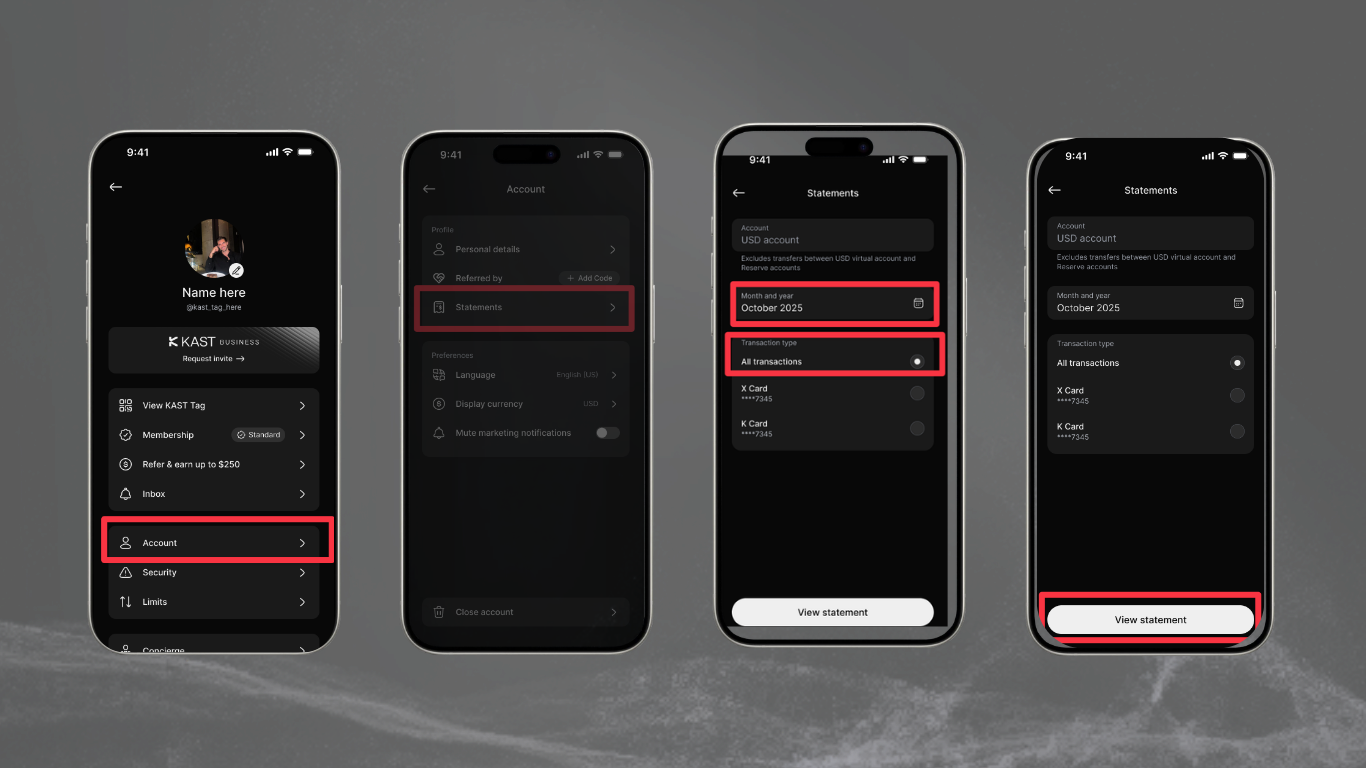
Choose All transactions if you want a consolidated statement for your account. If you are reviewing a specific card, you can select an active card instead.
This makes it easier to use the statement for different needs. You might want a complete account overview, or you might only need to review activity connected to one card.
How to Get Your Statement
Your statement is available from the KAST app.
From the home screen, open View transactions. You can also go to Accounts, select an account, and choose Statement. From there, tap See more, select the month and transaction type you want to review, then tap View statement.
When the statement is ready, you can download it as a PDF or export it as a CSV.
Start With a Clearer View of Your Account
Your transaction history tells you what happened. Your statement helps you understand the full period.
Choose the month you need, select whether you want all transactions or activity from a specific card, and download the format that works best for you. Open the KAST app to get started.
Disclaimer: This content is for general informational purposes only and does not constitute investment, legal, tax, or financial advice. Digital assets involve high risk and may result in total loss. Please do your own research and consult professional advisors before making any decisions. Read full disclaimer here.