How Google Authenticator and Transaction Limits Help Protect Your KAST Account
Learn how Google Authenticator and transaction limits help protect your KAST account, add stronger checks, and control transfers and card spending.

Money can move fast. That is why account security should not start after something goes wrong.
At KAST, we give you tools to add stronger checks before money leaves your account. Google Authenticator helps protect sensitive actions. Transaction limits help control how much can move through transfers and card spending.
Together, they strengthen protection for your account and funds.
This guide explains why Google Authenticator and transaction limits matter, how they work in KAST, and how to set them in the app.
Why Google Authenticator and Limits Matter
Google Authenticator and transaction limits protect your KAST account in different ways.
Google Authenticator adds an extra security check. Transaction limits set boundaries for money movement.
That matters because unauthorized activity can start small. It may begin with a login attempt, a device issue, exposed card details, or a test payment. If the account has higher limits, more money may move before you notice.
With the right setup, we can add stronger verification around larger or unusual actions.
| Security tool or control | What it helps with |
|---|---|
| SMS or email one-time passcode | Helps verify account access |
| Google Authenticator | Adds a second security check |
| Transaction limits | Set transfer and spending boundaries |
| Additional verification | May apply to larger or higher-risk actions |
| Card limits | Help control daily card spending |
The goal is simple. Everyday activity should stay smooth, while larger or unusual activity may require stronger verification.
How Google Authenticator Adds Stronger Protection in KAST
We use one-time passcodes sent by SMS or email to help verify account access. This is your first layer of protection.
Google Authenticator adds another security check on top of that. This is your additional, second layer of protection in the KAST app.
Once enabled, we may use Google Authenticator for stronger verification when your account needs extra protection, such as during sensitive actions or higher-risk activity.
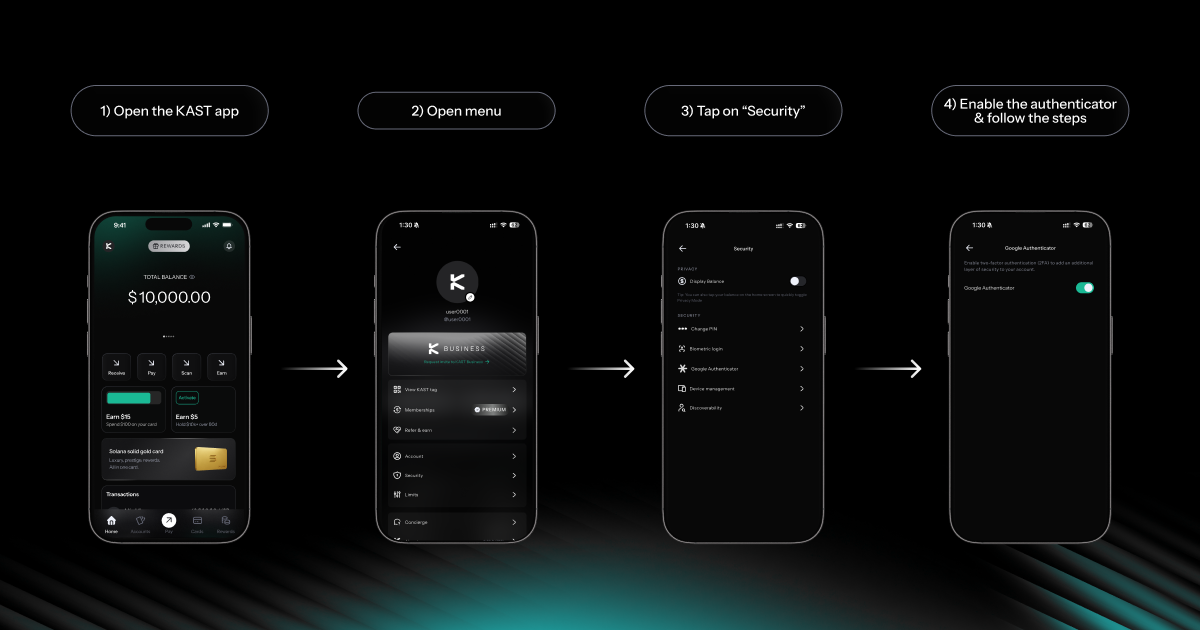
You can find it here:
| Step | What to do |
|---|---|
| 1 | Open the KAST app |
| 2 | Tap your profile or name icon in the top-left corner |
| 3 | Open Security |
| 4 | Select Google Authenticator |
| 5 | Follow the setup steps in the app |
Security settings may also include PIN settings, biometric login, device management, and discoverability controls.
Keep your Google Authenticator backup key somewhere safe. If you lose access to your device or authenticator app, account recovery may take longer.
How Do I Enable Two-Factor Authentication (2FA) on My KAST Account?
How Transaction Limits Work in KAST
Transaction limits let you set boundaries for different types of account activity.
You can manage them in the KAST app:
| Step | What to do |
|---|---|
| 1 | Open the KAST app |
| 2 | Tap your profile or name icon in the top-left corner |
| 3 | Open Limits |
| 4 | Choose the transaction type |
| 5 | Set the available daily or transaction limit |
The Limits section shows the main categories in one place.
| Limit category | What you can manage |
|---|---|
| KAST User Transfer | Daily limit and transaction limit |
| Bank Transfer | Daily limit and transaction limit |
| Onchain Transfer | Daily limit and transaction limit |
| Card Transaction | Daily card transaction limit |
Each limit category protects a different type of movement.
KAST User Transfer limits help manage transfers to other KAST users. Bank Transfer limits help control bank payouts. Onchain Transfer limits matter because blockchain transfers are usually final after they are sent. Card Transaction limits help control daily card spending.
How Limits Add Stronger Protection
Limits are not only for budgeting. They also help protect your KAST account.
For some transfers, we may ask for a one-time passcode when the amount is below your limit. If the transaction goes above your limit, we may ask for additional verification, such as a face scan or Google Authenticator code.
For card spending, we may decline a transaction above your preset card limit.
| If this happens | What may happen |
|---|---|
| Transfer is below your limit | We may ask for a one-time passcode |
| Transfer is above your limit | We may ask for enhanced security |
| Card transaction is above your limit | The transaction may be declined |
This setup keeps everyday use simple while adding stronger checks around larger movements.
For example, you may use KAST for small transfers, daily card payments, or regular payouts. If your limits match your normal use, a much larger transaction will not move through in the same way.
How Limits Can Help Reduce Larger Losses
A transaction limit controls how much can move at once. A daily limit controls how much can move in total.
If someone tries to move more than your usual amount, we may ask for enhanced security, decline the transaction, or apply another control before a larger amount leaves your account.
This matters most for actions that can move quickly or may be hard to reverse. Onchain transfers are usually final once sent. Bank transfers may involve external rails and review steps. Card payments can happen quickly if card details were exposed.
Set limits around how you actually use KAST:
- how much you usually send in one transfer
- how much you usually spend with your card in one day
- how often you use bank transfers
- whether you use onchain transfers
- which actions need tighter protection
You do not need the same limit for every category. Your card limit can differ from your bank transfer limit. Your onchain transfer limit can also be tighter than your KAST User Transfer limit.
Keep Your Verification Channels Secure
Your KAST account security also depends on the channels you use to receive verification codes.
Keep the email address linked to your KAST account secure. Also protect your mobile number if you receive codes by SMS or WhatsApp.
Lock your device, keep your SIM protected, and act quickly if your phone number suddenly loses service.
Never share one-time passcodes with anyone. KAST will not ask you to send verification codes through chat, email, or social media.
Set Up Your KAST Account Security
Google Authenticator and transaction limits work best when you set them before you need them.
Open Security and enable Google Authenticator. Then open Limits and review each transaction category.
No security setting can guarantee that fraud will never happen. However, Google Authenticator, transaction limits, and secure verification channels can help reduce the risk of larger losses if someone gets unauthorized access to your account.
If something looks suspicious, freeze your card where relevant, review your recent activity, and contact Concierge.
Open KAST today. Enable Google Authenticator, review your transaction limits, and keep your email and mobile number secure.
Disclaimer: This content is for general informational purposes only and does not constitute investment, legal, tax, or financial advice. Digital assets involve high risk and may result in total loss. Please do your own research and consult professional advisors before making any decisions. Read full disclaimer here.