Send And Receive ARS With Local Bank Transfers - Right Inside KAST Pay


If you need to send ARS (Argentina Pesos) to a local bank account, you can now do it inside KAST Pay. In addition, if you are an eligible Argentine resident, you can also receive ARS using your own CVU details in the app.
No extra apps. No side steps. Just open KAST Pay and complete the transfer.
What You Can Do
You can do both sides in one place:
- Receive ARS with your personal CVU details in KAST (eligible Argentine residents only)
- Send ARS from KAST to any local bank or wallet destination
- See the full cost upfront before you confirm
Simple steps. Clear numbers. No surprises.
Why This Makes Your Life Easier
1. Move Money in One Flow
You can send ARS or receive ARS without switching tools. As a result, you keep your transfers inside one app.
2. Keep Transfers Organized
Each transfer appears in your KAST history. Therefore, you can check the status, timing, and full details anytime.
3. Review the Exact Quote Before Sending
Before you confirm any transfer, you see the full quote, including fees and FX. Since we’re launching with 0% fee, the quote still shows the FX rate and the exact amount the recipient gets, so you can review everything and then confirm.
How It Works
Receiving ARS (Eligible Residents Only)
To receive ARS, open KAST Pay → Receive → ARS. You will see your personal CVU details in the app. Copy the details and share them with the sender.
After the sender completes the transfer, KAST converts the ARS deposit and settles it in USD stablecoins on KAST. Then you can view the completed deposit and details in your transaction history.
If you cannot see Receive ARS, your profile is likely not eligible. This flow is limited to Argentine residents with a DNI or Argentine passport.
Sending ARS (All KYC Users)
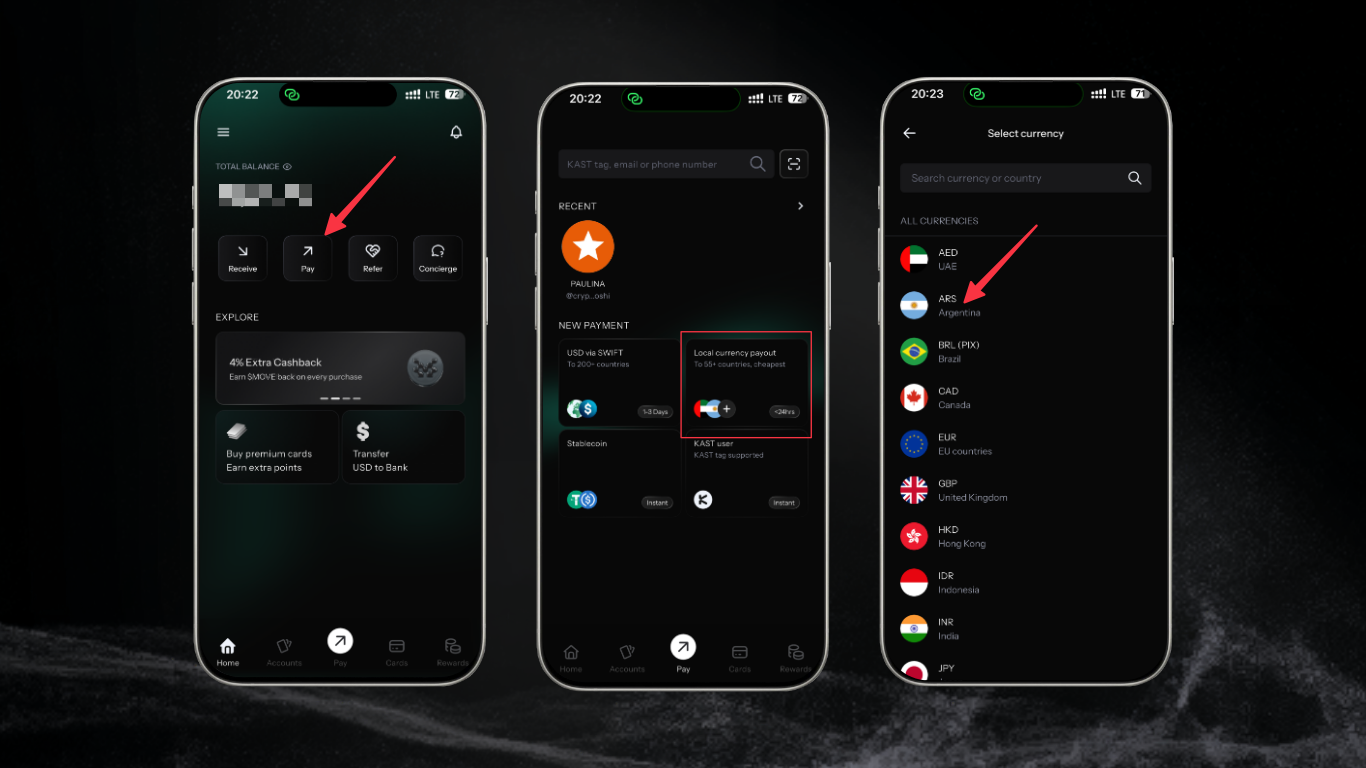
To send ARS, go to KAST Pay → Send → Bank Transfer → ARS. Enter the recipient’s details using Alias, CBU, or CVU.
Before you confirm, KAST shows the full quote with the total cost. After you confirm, you can track the transfer status in your transaction history.
What It Costs
There’s no fixed fee to send or receive ARS. Any taxes or FX costs are included in the quote you see before confirming, so the total shown is the real total.
Limits and Notes
The minimum transfer amount is 500 ARS. There is no maximum limit.
If a payout goes to a closed or rejected account, refunds are not automatic. Instead, the refund is processed manually after the banking partner confirms the return, which can take 1 to 2 business days.
If you are an Argentine user verified with a driver’s license or residence permit, you may see a Contact Concierge error. In that case, support needs you to update your documents to a passport or DNI and retry.
Ready
Open KAST Pay and tap ARS under Send or Receive.
If you need to send ARS to someone’s local bank account, or you are an eligible Argentine resident receiving ARS, you can now do it directly in KAST Pay.
Check the full fees and conditions for KAST cards and accounts before you get started.