App Features

How Can I Spend Crypto Using PIX In Brazil with KAST?

You can now use your crypto to pay for everyday needs in Brazil - from your morning coffee to a night out. With KAST, you send your crypto, it automatically converts to stablecoins, and you can spend instantly anywhere using your KAST Card, Mobile Wallets, or the latest PIX integration.

After you deposit, your balance stays in USD, protecting your funds from inflation and giving you instant spending whenever you need it.

How to Get Started with KAST in Brazil
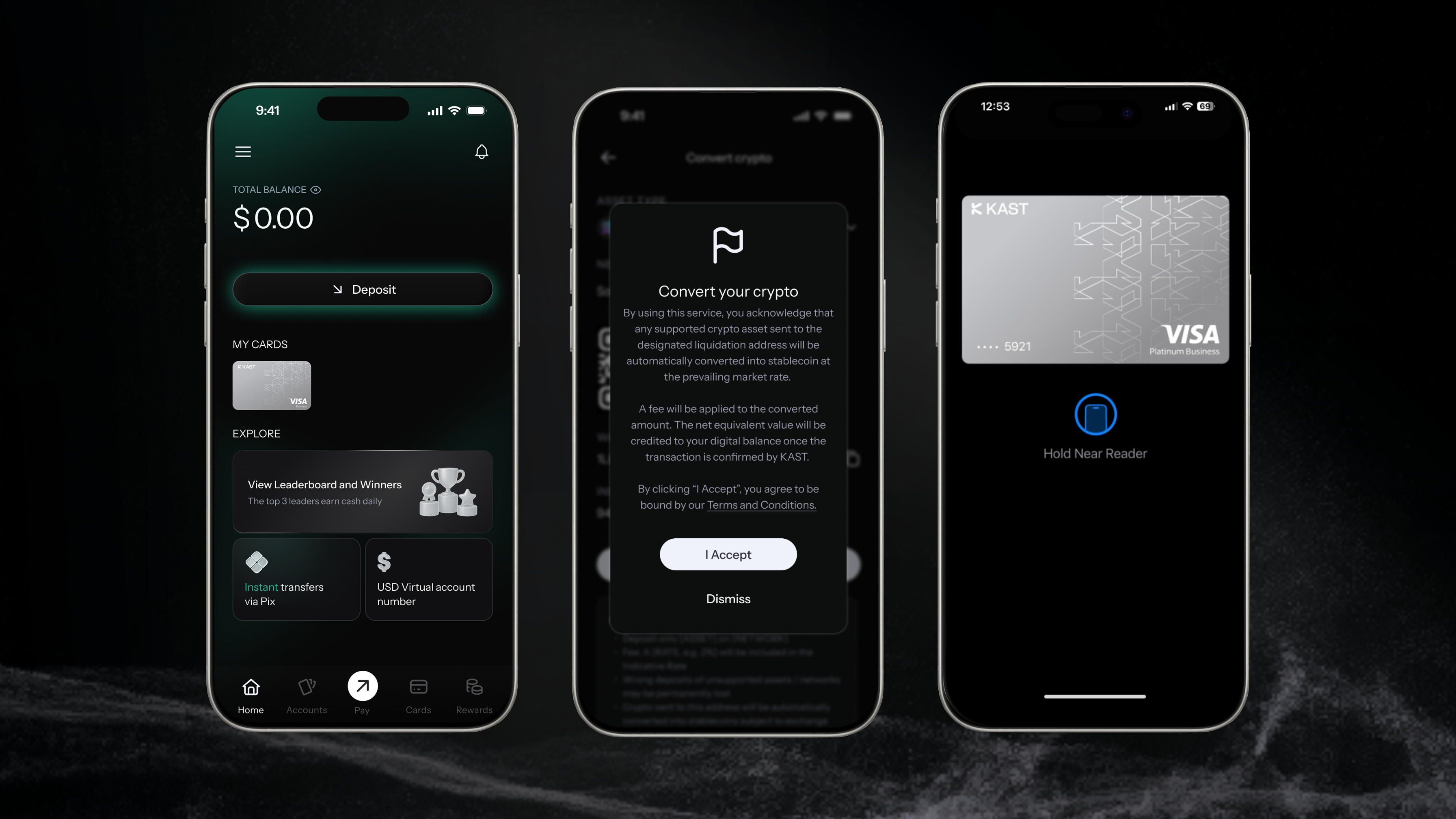
  1. Open your account and deposit stablecoins - they go straight to your USD balance at 1:1.
  2. Send other cryptocurrencies and KAST will automatically convert them to stablecoins at the best rate.
  3. Your KAST Card is ready to use in Brazil. Add it to Apple Pay / Google Pay or use your physical card at any Visa-accepted location.


3 Ways to Spend Crypto in Brazil with KAST

KAST makes it easy to spend your crypto in the real world - in any store, café, or restaurant that accepts PIX or Visa.
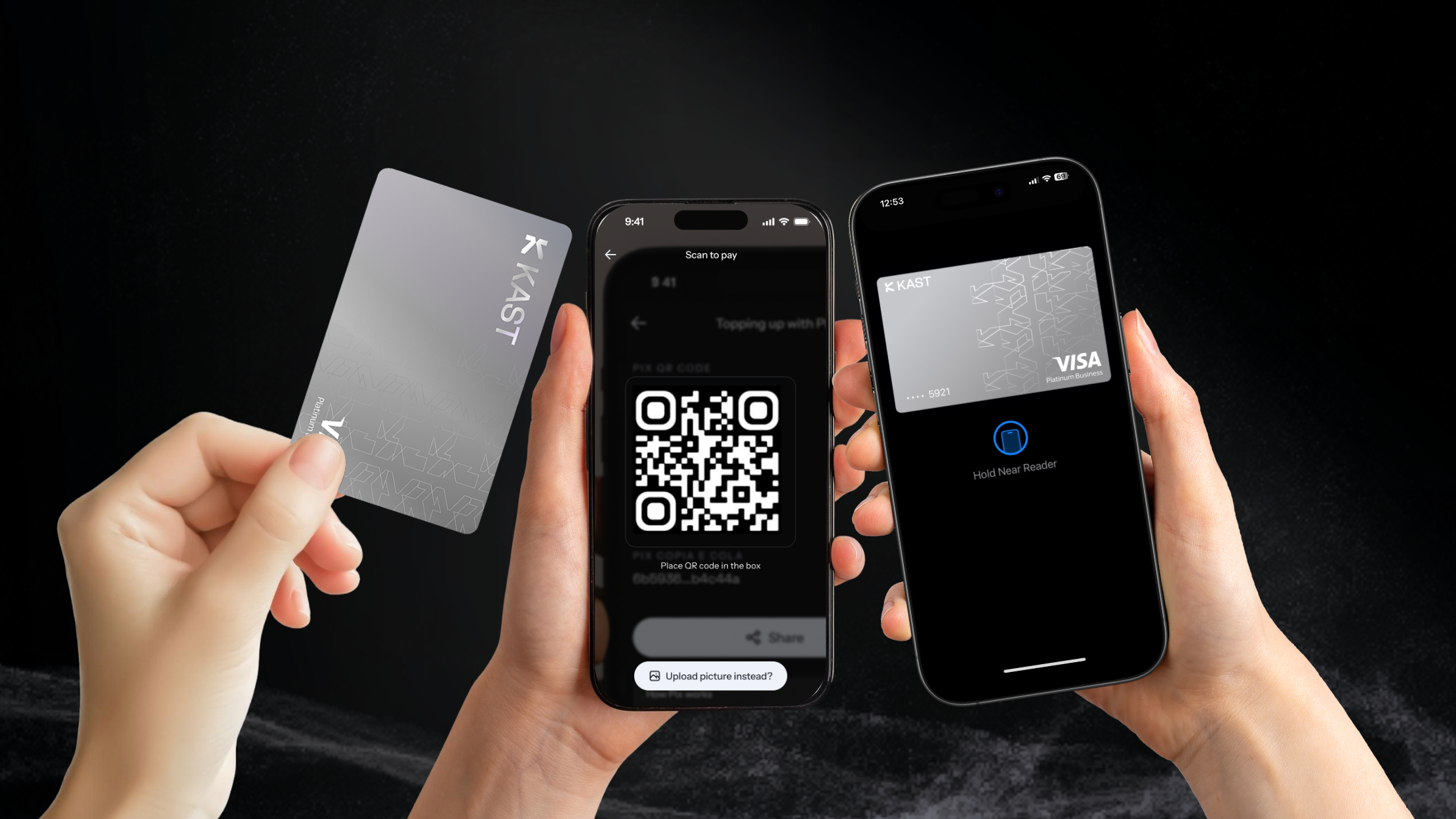
Option 1: KAST Card

Tap or insert your physical KAST Card and pay instantly. Your crypto converts from USD → BRL at the moment of purchase. Fast, simple, done.

Option 2: PIX Scan to Pay

Open the KAST app, scan the merchant’s PIX QR code, confirm, and pay. The app converts your crypto to BRL instantly, and the merchant receives it right away.

Option 3: Mobile Wallet (Google Pay or Apple Pay)

Use your KAST Card through Google Pay or Apple Pay for fast, contactless spending. Add your virtual card to your phone and pay anywhere with a tap.


How Do I Spend My Crypto in Brazil Using PIX?

The KAST app makes it easy to spend your crypto balance at any merchant in Brazil that accepts PIX.

  1. Scan the QR Code: Open the KAST app and scan the merchant’s PIX QR code at checkout.
  2. Review and Confirm: Your KAST app shows the BRL total the merchant receives and the equivalent USD amount deducted from your balance.
  3. All Done: The merchant receives BRL instantly.


What Are the KAST Card Fees When I Pay in Brazil?

When you pay in BRL, KAST handles the conversion from USD → BRL using a transparent market-based rate plus a 2% FX fee.

If you choose to pay in USD (when available), some merchants may use Dynamic Currency Conversion (DCC) - applying their own exchange rate, which is often higher than KAST’s.

There’s no standard transaction fee per purchase (including Apple Pay and Google Pay).
However:

  • A $0.50 declined transaction fee applies only if your payment fails due to insufficient balance.
  • For non-USD transactions below $25, a small $0.10 low-authorization fee may apply.

PIX Scan to Pay

When you use PIX Scan to Pay, your crypto is converted instantly to BRL at the market rate. There’s no transaction fee for the payment itself.

When depositing via PIX, customers are charged a total FX markup of 0.88%.

For PIX payouts, there’s a 1% conversion fee total.

For full fee details and terms, visit the KAST Fees & Conditions page.


Which Receipt Option Should I Choose at the Terminal?

When paying with your KAST Card or mobile wallet (Apple Pay / Google Pay), the terminal may ask if you want to pay in BRL (Real) or USD (Dollar).

Although it might seem logical to choose USD if your balance is in dollars, in Brazil we recommend almost always select BRL (Real).

Why You Should Choose BRL

  • Most merchants only process BRL, even if you choose USD.
  • Selecting USD triggers Dynamic Currency Conversion (DCC) by the merchant or processor - using their own (often worse) exchange rate.
  • Selecting BRL lets KAST handle the conversion, applying a transparent market-based rate + up to 2% spread.

Example: Paying in Brazil - BRL vs USD

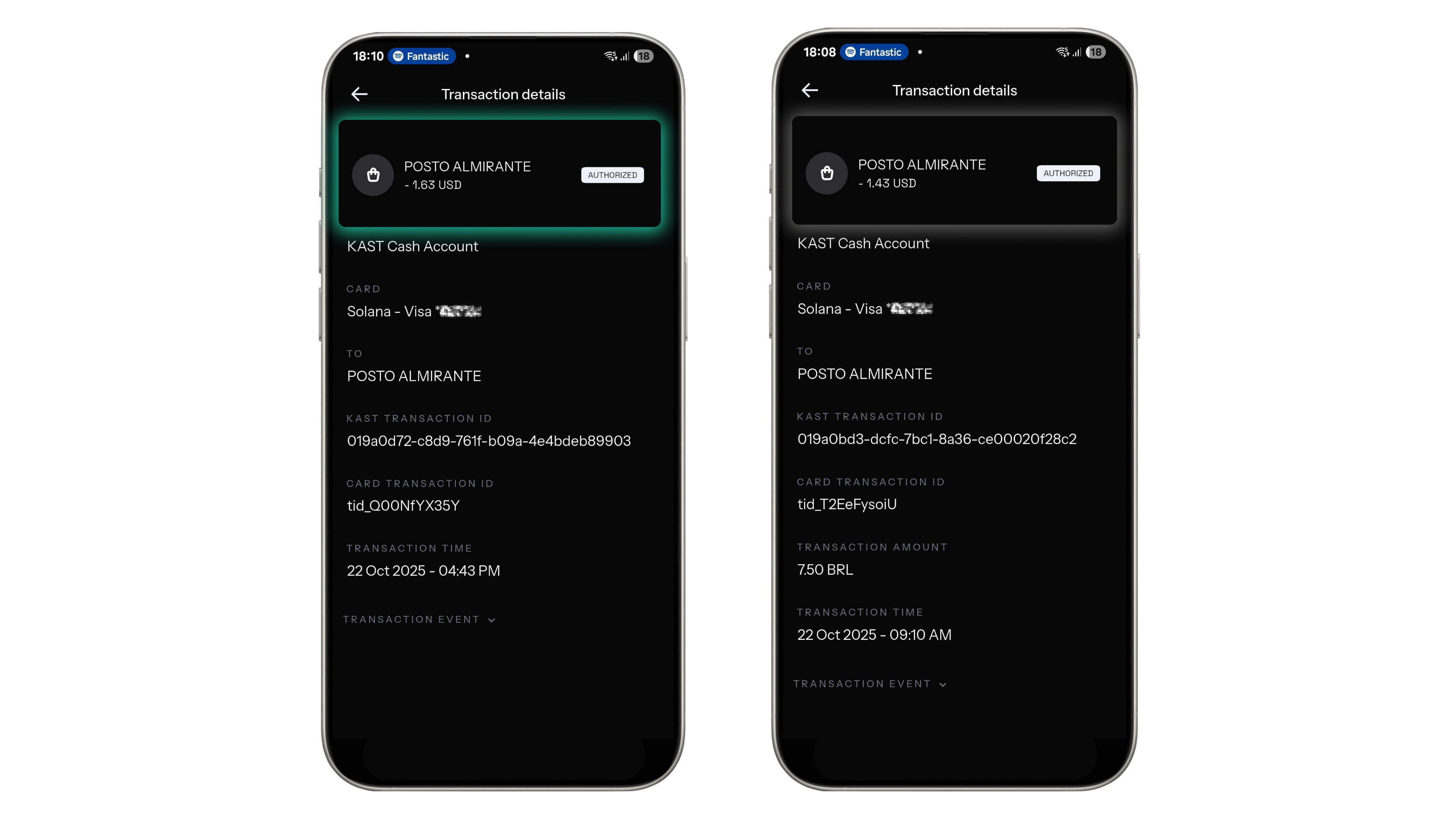
Here’s an example from a coffee shop in Blumenau, Santa Catarina, where the same R$7.50 item was paid twice - once selecting BRL, and once USD.

Option 1: Paying in BRL (Recommended)
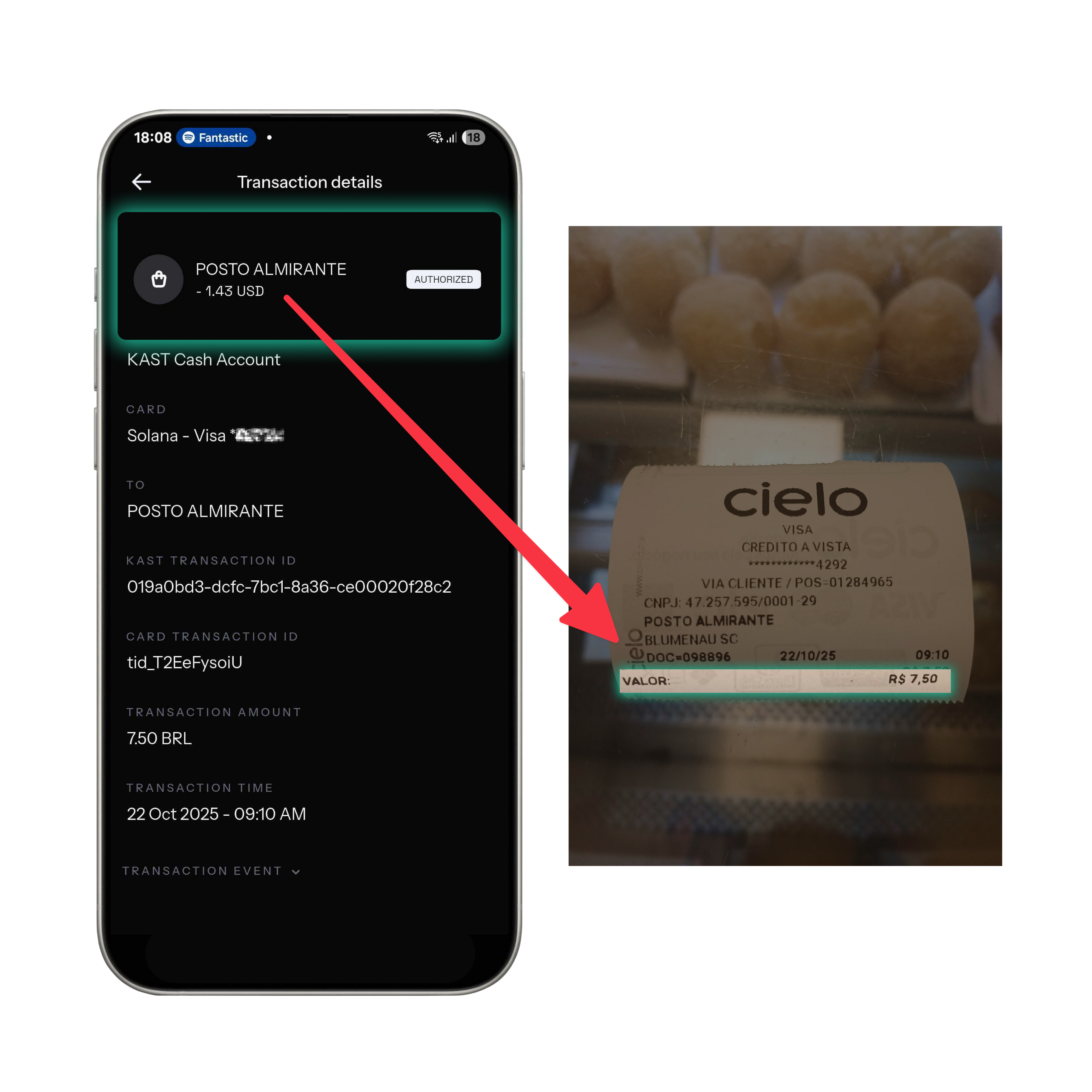
Detail Value
Terminal Selection BRL (Real)
Conversion By KAST
Amount Charged $1.43 USD
Exchange Rate 1 USD = R$5.24
Outcome Lower total cost, transparent market rate ✅


Option 2: Paying in USD (Merchant Conversion)
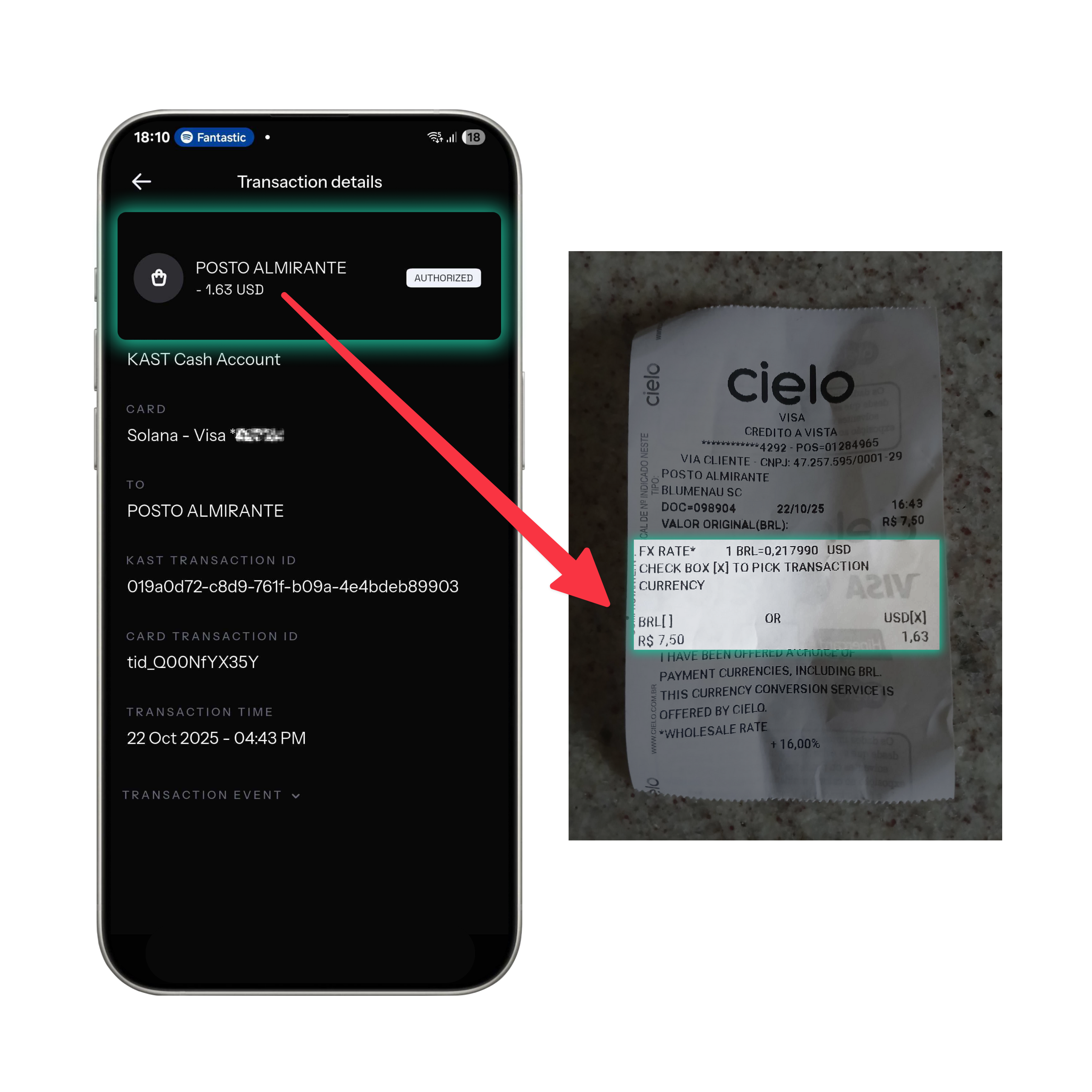
Detail Value
Terminal Selection USD (Dollar)
Conversion By Merchant/Processor (Cielo)
Amount Charged $1.63 USD
Exchange Rate 1 USD = R$4.60
Outcome Higher cost due to merchant markup (~14%) ❌


Cost Comparison Summary

Option Conversion
By
Amount
Charged
Exchange
Rate
Difference
BRL Recommended KAST $1.43 USD 1 USD = R$5.24 ✅ Lower cost
USD Merchant Cielo $1.63 USD 1 USD = R$4.60 ❌ ~14% higher cost
Tip : When paying in Brazil, always choose BRL (Real) at the terminal. This ensures KAST - not the merchant - handles your currency conversion, usually resulting in a lower overall cost and more transparent rates.


Watch KAST in Action

Want to see how it works in real life? Check out these videos featuring our Brazilian users paying with KAST at local merchants - using the KAST Card, Apple Pay, and PIX Scan to Pay:

Disclaimer: This content is for general informational purposes only and does not constitute investment, legal, tax, or financial advice. Digital assets involve high risk and may result in total loss. Please do your own research and consult professional advisors before making any decisions. Read full disclaimer here.

Spend your crypto like cash.

USDC, USDT & USDe. Global reach. Instant card.

Share this post

Readers also like:

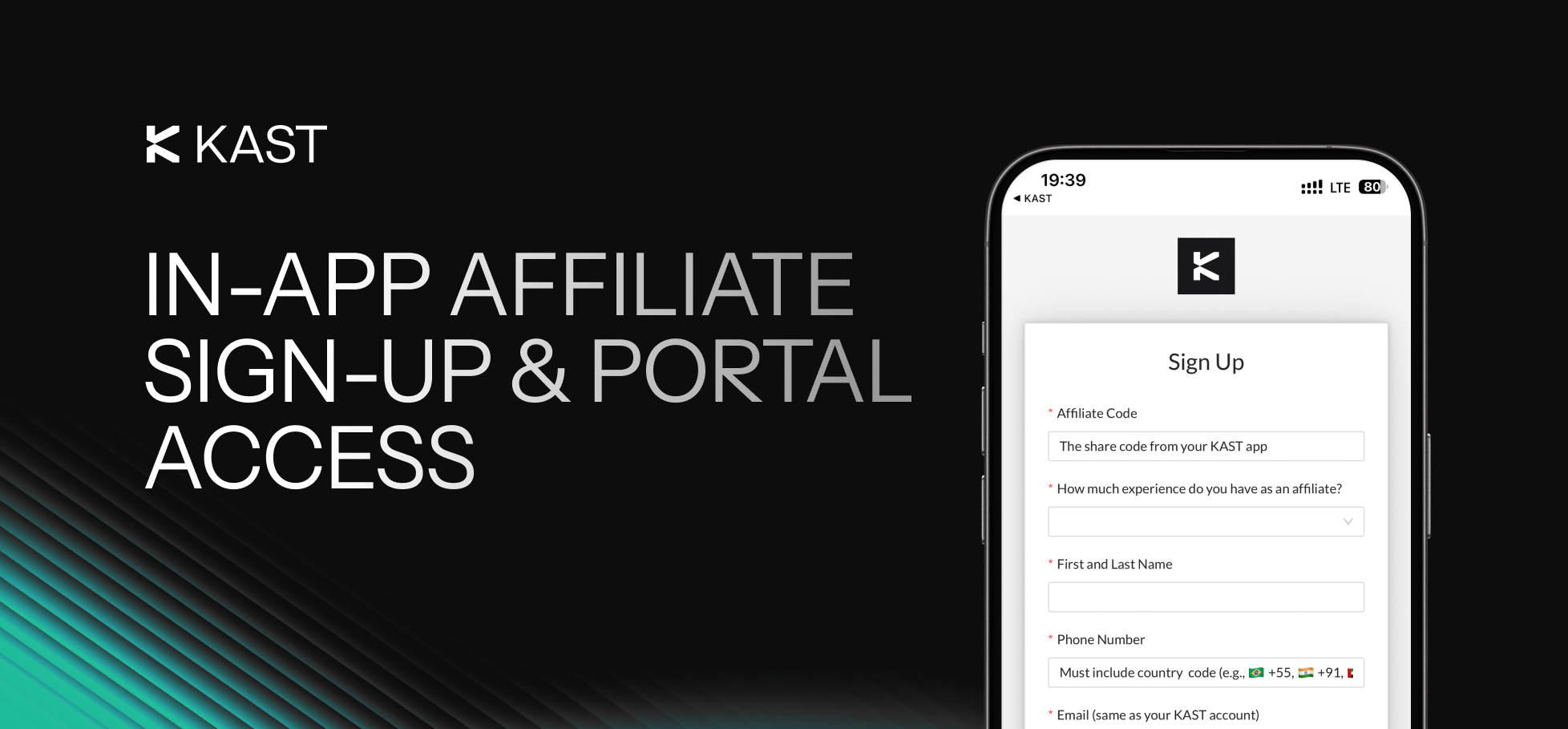
KAST Adds In-App Affiliate Sign-Up and Portal Access

You’ve probably talked about KAST without even thinking about it. Maybe someone asked how you receive USD from abroad. Maybe they were curious how you actually spend stablecoins in daily life. Maybe you dropped your referral link in a group chat and moved on.But you never really know what happens next.Now you can turn those casual conversations into something structured and measurable — without creating a separate account or searching for signup pages. You can apply to the KAST Affiliate Program directly inside the app.There are no extra logins, no separate platforms to manage, and no added friction. It starts exactly where you already are.Why Apply Inside The App?Most affiliate programs sit outside the product experience. You usually have to search for the right signup page, create a separate login, manually connect your referral code, and then switch between different dashboards just to keep track of everything. It often feels disconnected from the product you’re actually using.With KAST, the process starts inside the app. You simply go to Home → Refer → Become an Affiliate.Because it’s built into your existing account, your email stays aligned, your referral code remains the same, and your identity is already verified. There’s no need to recreate information or manage a separate profile.Keeping everything in one place reduces friction, minimizes back-and-forth during review, and makes the whole process more straightforward.How The Application Process WorksStep 1: Apply From The AppOpen your KAST app and go to:Home → Refer → Become an AffiliateThen:Tap ReferTap Become an Affiliate (top corner)The application form opens in your browser.It’s short and focused. You’ll be asked for:Your affiliate code (from the app)Name, phone number, and KAST emailPrevious affiliate experience (if any)Optional links (Telegram, LinkedIn, etc.)Your main channels and audience countriesA short note about how you plan to promote KASTSubmit the form. That’s it.Step 2: Get Access To The PortalAfter internal review, approved applicants receive access to the Affiliate Portal.From there, you can:Track referrals in real timeMonitor rewardsSee which content drives resultsOptimize how you promote KASTYou don’t need to change how you share. You just gain visibility into performance.See what actually drives sign-upsImagine you run a Telegram group about digital payments and crypto tools.Members often ask:How do you receive USD from clients?How do you spend stablecoins locally?How does the KAST Card work in daily life?You’ve been sharing your referral link casually. Some people sign up — but you don’t know how many, or why.After applying through the app and getting approved, that changes.Now you can see:Which posts generate sign-upsWhich use cases resonate mostWhether your audience responds more to the KAST Card or Local PayoutsInstead of guessing, you have data.Instead of casually sharing, you’re running something structured.How This Fits Into the KAST EcosystemMost affiliates promote what they already use. In practice, that means they talk about real things they do in KAST. For example, they receive USD into their KAST Global USD account, hold stablecoins like USDC, and spend globally with the KAST Card. They also use local payouts to convert funds into local currency when they need to.When your content reflects real usage, referrals feel natural. You are not pushing a product. Instead, you are showing how you use KAST in daily life. People understand the value because they see it in context.The Affiliate Program simply adds tracking and structure to what you already do inside KAST.What It CostsThere is no fee to apply.If approved, commissions and rewards are visible inside the Affiliate Portal.Eligibility criteria, reward structures, and approval timelines may change and are subject to internal review.Quick Checklist Before You ApplyYou actively use KASTYou have an audience (community, social media, newsletter, etc.)You can explain real use cases clearlyYou’re willing to promote responsiblyIf that sounds like you, the process takes just a few minutes.Ready To Apply?Open the KAST app and go to:Home → Refer → Become an AffiliateOr learn more at:https://www.kast.xyz/affiliateStart in the app.Apply in minutes.Track everything in one place.
Read

Meet KAST CTO: Sameera Nilupul

Profile of KAST CTO Sameera Nilupul, his background, leadership approach, and building global money movement infrastructure.
Read

Y Combinator (YC) Startups: Here's an exclusive promo from KAST

YC startups can claim KAST Business perks, including credits, premium cards, cashback, team accounts, and concierge onboarding.
Read

Explore KAST Academy

What Are Crypto Wallets

Crypto Wallets 101: How They Work, and How to Keep Your Funds Safe

A crypto wallet doesn’t actually store your crypto, it gives you access to it. In this guide, learn how crypto wallets work, the different types available, and how to choose the right one while keeping your funds secure.
Read
Read article
Why are Solana gas fees so cheap

What Are Gas Fees and Why Are They So Cheap on Solana?

Gas fees are the cost of processing transactions on a blockchain. Some networks charge dollars or more per transaction, while others charge fractions of a cent. The difference comes down to how each blockchain is designed, and why Solana makes everyday crypto spending fast and cheap.
Read
Read article
What is Pudgy Penguins

What Is Pudgy Penguins and How to Get the Pengu Crypto Card?

Pudgy Penguins started as a 2021 NFT collection but has grown into a global brand with retail toys, a loyal community, and the PENGU token. Now, with the Pengu Card powered by KAST, that identity extends into everyday spending, letting you use crypto or fiat at 150M+ merchants and ATMs worldwide.
Read
Read article
As seen in
Press enquiries

Got a media enquiry?

If you have a media enquiry, please get in touch with us at media@kast.xyz. For customer questions, please use support@kastcard.com.

A moody, cloudy sky in black & white
Get KAST
Get KAST