KAST Card Security: What Protects You Before and After Fraud?
Fraud can start with one strange login or one small test charge. This guide explains how KAST card security works, what to do first if something looks wrong, how disputes move forward, and where the limits are.

Fraud can start with one strange login, one small test charge, or one purchase that makes no sense. When that happens, you need two things fast: controls you can use right away and a clear path to follow after that.
That is how KAST card security works. We help protect your account before fraud happens. Then, if something looks wrong, we give you tools to act quickly and a process to move the case forward.
This guide walks you through both sides. You will see what helps protect your account, what to do first, how disputes work, and where the limits are.
Security starts before fraud starts
The first job is simple: make it harder for anyone else to get into your account or use your card.
We do that through account access protections, card controls, and monitoring that looks for unusual behavior. These layers matter because fraud does not always begin with a stolen physical card. Sometimes it starts with compromised login details, a phishing message, a fake website, or exposed card data.
Here is what helps protect you before fraud happens:
- Strong password requirements to reduce weak account access
- Multi-factor authentication for an extra login check
- Biometric login where supported on your device
- Device verification to help spot unfamiliar access attempts
- Real-time monitoring for unusual logins, odd spending patterns, and activity that looks out of character
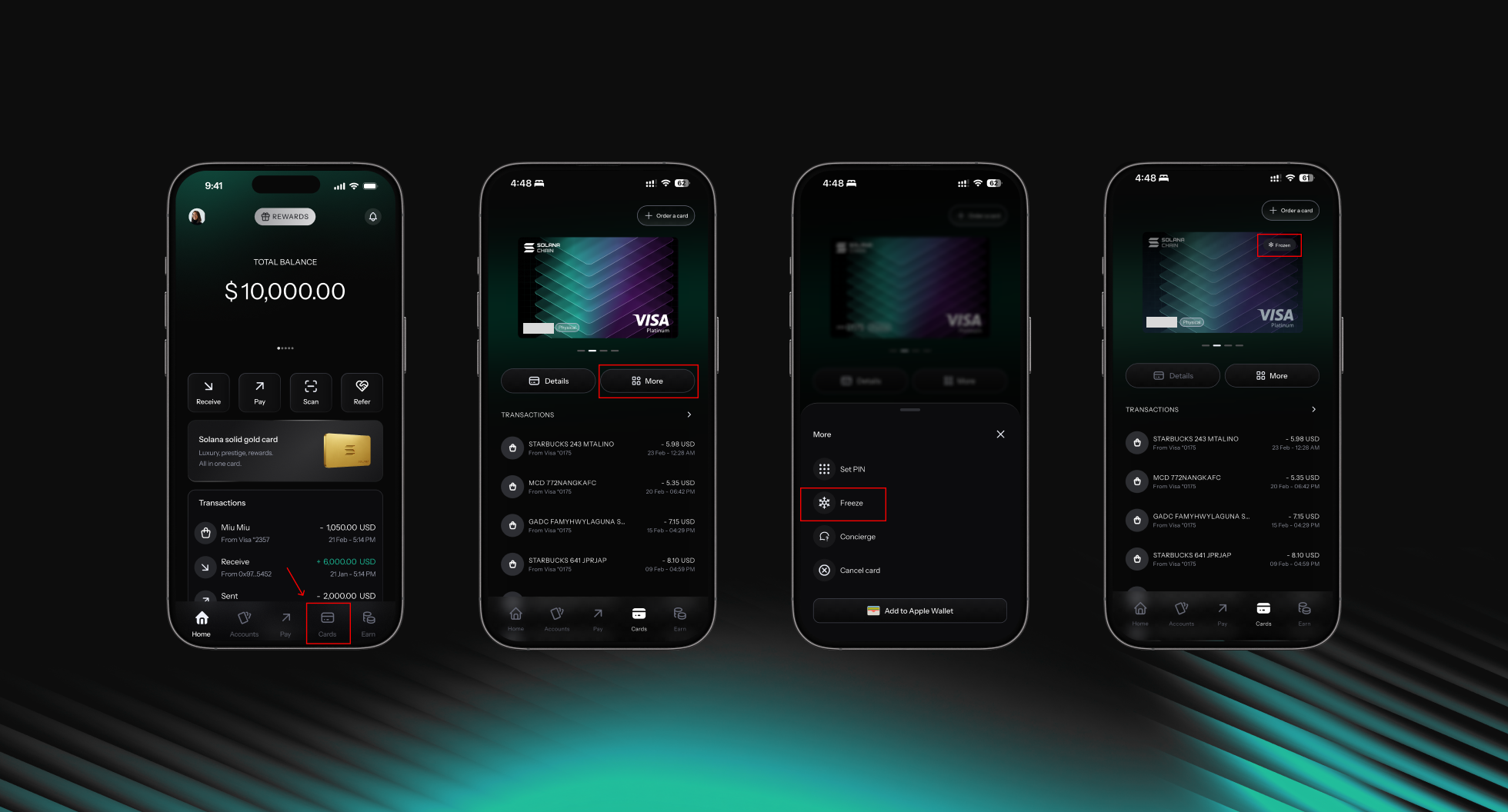
- In-app card freeze so you can stop new card spending fast if something looks wrong
That mix matters because fraud is rarely one single event. It is usually a chain. Good security breaks that chain early.
Join KAST and use the protections built to help keep your money and account secure.
Most fraud starts with access
A lot of fraud starts before any strange charge shows up on your card. In many cases, the real problem begins earlier, when someone gets access to something they should not have.
That can happen in simple ways. A fake message asks for your verification code. A login link leads to a fake page. A card is used on an unsafe site. A merchant gets breached. A public Wi-Fi connection exposes sensitive data. The method changes, but the pattern stays the same: someone gets in before they spend.
That is why the basic habits still matter so much. Do not share OTP or verification codes. Do not click suspicious login links. Use a password you do not reuse anywhere else. Keep notifications turned on so you can spot unusual activity quickly. Also, use private, secure connections when making payments.
None of this is complicated. Still, these small steps can stop a lot of bigger problems later.
Your fastest control is the card freeze
If one feature matters most in the moment, it is this one.
You can freeze your card in the KAST app immediately. That gives you a way to stop additional card use while you check recent activity and contact Concierge.
Freezing is not the full solution. Still, it is the best first move when you see something suspicious. It buys time. It limits damage. It gives the case a cleaner starting point.
What to do in the first few minutes
If you think fraud may be involved, do not start with guesswork. Start with action.
Follow these steps in order:
- Freeze your card in the KAST app
- Contact KAST Concierge right away
- Review your transaction history carefully
- Collect the key facts
- transaction amounts
- dates and timestamps
- merchant names
- suspicious login alerts
- screenshots or related emails
File a police report if the case involves a scam or clear criminal activity
That order helps for a reason. Freezing can stop fresh charges. Concierge can review what may still be preventable. Your records make the investigation easier to handle.
If you clicked a suspicious link or shared details by mistake, also change your password and make sure MFA is on.
Contact Concierge, complete the requested checks, and follow the steps to get your KAST account reviewed and restored.
What happens after you report it
Once you report suspected fraud, we review the case and guide you through the next step.
That review may include extra verification or supporting documents. Depending on the case, we may ask for transaction details, screenshots, related messages, or other evidence that helps confirm what happened.
The usual process looks like this:
- Concierge reviews the case
- We may request more information
- The investigation moves through the required checks
- We update you on what is possible next
Many fraud investigations are completed within 1 to 2 weeks, although timing depends on the case and the verification required.
Recovery is not guaranteed. That is especially important when a transaction is already final or falls outside what can be reversed.
Not every case works the same way
This part matters because not every bad payment is the same. People often put everything under one label, but the path depends on what actually happened.
Some cases involve unauthorized card charges. Some are merchant problems, like billing errors or failed cancellations. Some are scams. Some involve on-chain transfers. Each one follows a different process, so the next step is not always the same.
There are also clear limits. We can investigate activity connected to your KAST account. However, we cannot step in and solve every dispute between a sender and a recipient. In some cases, a transfer cannot be reversed once it is completed. On-chain transactions are even stricter, because once they are submitted, they cannot be canceled.
That is why acting fast matters. It also matters to choose the right path from the start.
Chargebacks are for real disputes, not regret
A chargeback is a protection tool. It is not a shortcut for getting money back from a valid purchase.
That distinction is important for both users and payment networks.
A legitimate chargeback may apply when:
- Your card was used without your consent
- You were billed twice
- A merchant failed to cancel after your request
- An item was never delivered
An abusive chargeback is different. That includes cases like:
- You authorized the purchase and changed your mind later
- You received the item or service and still filed a dispute
- You forgot to cancel a subscription and tried to reverse it through a chargeback instead
- You used the dispute process as a replacement for a refund request
False or repeated abusive chargebacks can lead to:
- Account review or restriction
- Card deactivation
- Loss of dispute privileges
- Fraud pattern reporting across payment systems
So before filing a chargeback, take these steps first:
- Check the transaction details carefully
- Contact the merchant when that makes sense
- Speak with Concierge if you believe the case is genuine
That helps you avoid the wrong path and move faster on the right one.
Read how chargeback abuse works, what counts as misuse, and how to avoid actions that can put your account at risk.
If the problem is an unauthorized card purchase
Unauthorized purchases need a more direct response.
First, freeze or block the card right away. Then review your recent activity carefully, including very small charges. In many fraud cases, a small test transaction appears first, and a larger charge follows after that.
Once you spot suspicious purchases, write down the date, amount, and merchant name for each one. Keep any screenshots, receipts, or emails that support your case. Then contact Concierge and share the key transaction details along with the last four digits of your card. If the merchant can still cancel or refund the charge quickly, it also helps to contact them directly.
If the case moves into a formal dispute, there are three points to know:
- Chargeback reviews may take up to 90 days
- A $30 processing fee applies
- Refunds depend on the outcome and are not guaranteed
That is why it helps to report suspicious activity as soon as you see it.
Freeze your card, review recent transactions, and contact Concierge fast if you spot an unauthorized purchase.
A simple example
Let’s say you open the app and see two purchases from a country you have never visited.
You freeze your card immediately. Then you check your history and notice one small charge followed by a larger one. You take screenshots, note the times and amounts, and message Concierge with the card’s last four digits and the suspicious transaction details. If the merchant is identifiable, you reach out there too. If the charges are clearly unauthorized, you follow the dispute process. That gives the review a clean starting point and reduces the chance of more charges landing while the case is open.
The point is not to panic. The point is to move in the right order.
Sometimes a decline is part of security
A declined transaction does not always mean your card failed. Sometimes it means the system noticed something unusual and stopped the payment for safety.
A transaction may be declined because of:
- Insufficient funds
- Wrong card details
- An expired, blocked, or restricted card
- Merchant or terminal issues
- Network-level delays
- Fraud prevention checks
If your payment gets declined, work through these steps:
- Confirm your balance covers the full amount
- Check that the card is active
- Review the card number, expiry date, CVV, or PIN
- Retry only if the issue is clearly fixed
- Contact Concierge if the decline continues
- Check with the merchant if there is no issue on our side
Some declines are annoying in the moment. Still, they can be part of the same system that helps protect your account.
Sometimes account protection goes further
In some cases, security goes beyond a declined transaction or a frozen card. When something needs a closer review, we may place a block or restriction on the account while we check what is happening.
That can happen for a few reasons. The activity may look unusual. There may be a verification issue. In other cases, the review may relate to compliance checks, suspected account compromise, or prohibited use. When that happens, some account functions may be limited for a period of time.
You may notice that you cannot log in normally, send money, create cards, make payments, or use your current cards. The exact limitation depends on the type of review.
If that happens, the next step is to contact Concierge in the app. If you cannot access the app, email support and include your full name, your registered email, and a short explanation of the issue. If we ask for documents, send them clearly and as quickly as possible so the review can move forward.
Depending on the case, we may ask for updated ID documents, proof of address, confirmation of recent activity, or source-of-funds information. That review is also part of account protection. It helps protect your funds and your account while the case is being checked.
How to tell if a charge is actually suspicious
Not every unfamiliar charge means fraud. Sometimes the merchant name looks different from the brand you know. Sometimes a small amount is only a temporary hold. In other cases, a subscription renewed, or someone in your family used the card.
Still, some charges deserve a closer look. That is usually the case when the merchant name looks random, the location or timing makes no sense, a very small charge appears before a bigger one, or no one else could realistically have used the card.
Before treating the charge as fraud, check the basic details carefully. Look at the merchant name, the location, the time, and the amount. Also think about whether it could connect to a subscription, a free trial, or a temporary hold from a hotel, gas station, or ride-share app.
This step helps you tell the difference between a real fraud case and a billing issue or confusing transaction label.
Your best prevention checklist
Good card security is mostly about consistent habits.
Use this checklist:
- Turn on MFA or 2FA
- Enable biometric login
- Keep app notifications enabled
- Never share your PIN, CVV, OTP, or full card details
- Avoid suspicious links and fake support messages
- Use secure connections for payments
- Monitor your transaction history regularly
- Freeze and replace your card if you think the details were exposed
- Keep a small buffer in your balance to avoid unnecessary declines
- Check recurring payments and stored card details from time to time
The point of all this
KAST card security is not one feature. It is a full system.
It starts with access protection. Then it adds monitoring, in-app controls, transaction review, support, disputes, and account-level protections when needed.
When you know how each part works, you can act faster, avoid the wrong steps, and protect your account with more confidence. If anything looks suspicious, contact Concierge as soon as possible so we can review it with you.
Disclaimer: This content is for general informational purposes only and does not constitute investment, legal, tax, or financial advice. Digital assets involve high risk and may result in total loss. Please do your own research and consult professional advisors before making any decisions. Read full disclaimer here.