You Can Now Send and Receive MXN With Zero-Fee SPEI on KAST


Move Mexican Pesos Without Paying Transfer Fees
Moving pesos between accounts shouldn’t quietly reduce your balance.
With the latest update, you can now move Mexican pesos (MXN) between your bank and KAST using SPEI with zero transfer fees. There are no workarounds, no special routing tricks, and no hidden conditions. You’re using Mexico’s existing bank infrastructure — just without paying extra every time you move your own money.
What This Means In Practice
SPEI is Mexico’s interbank transfer system, operated by Banco de México. It’s the infrastructure banks use to move pesos between accounts using a CLABE (Mexico’s standardized bank account number). In other words, it’s the same system your bank already relies on every day.
Now, KAST connects directly to that same rail. That means you can send and receive MXN between KAST and any Mexican bank account as a normal bank transfer — without a platform fee added on top.
You can:
- Receive MXN from any Mexican bank into KAST
- Send MXN from KAST to any Mexican bank
- Pay 0% transfer fees on both deposits and payouts
If you convert between MXN and USD inside the app, the FX fee for MXN is now 0%. So moving pesos from one account to another is now even easier and cheaper.
A Real-World Example
Imagine you’re a freelancer based in Mexico working with both local and international clients. A local client pays you in MXN, and the money lands in your traditional bank account. Later, you need to move part of it to another platform to convert currencies, pay for international services, or manage it alongside USD. Each transfer adds friction. Sometimes it’s small. Sometimes it’s noticeable. Either way, it adds up.
Now your client sends pesos directly to your KAST CLABE using SPEI. The MXN lands in your KAST balance without a transfer fee. From there, you decide what happens next.
You might:
- Hold your balance in USD, all inside the app.
- Shop at Costco, dine at Rosseta, enjoy a VIP cinema night, or use it anywhere on your next travels.
- Send a SPEI transfer to cover your rent and send money to your family.
There’s no fee every time you shift the money. Over weeks or months of recurring payments, removing that friction meaningfully changes the math.
How To Receive MXN In KAST
Receiving pesos through SPEI takes only a few steps:
.png)
- Open the KAST app
- Tap Receive
- Select SPEI
- Copy or share your CLABE
Paste your CLABE in your bank app to send MXN to yourself, or share it with a client or employer so they can pay you. After they send the SPEI transfer, the MXN arrives in your KAST balance. Timing depends on your bank’s processing windows.
How To Send MXN From KAST
Sending pesos works the same way — simple and direct:
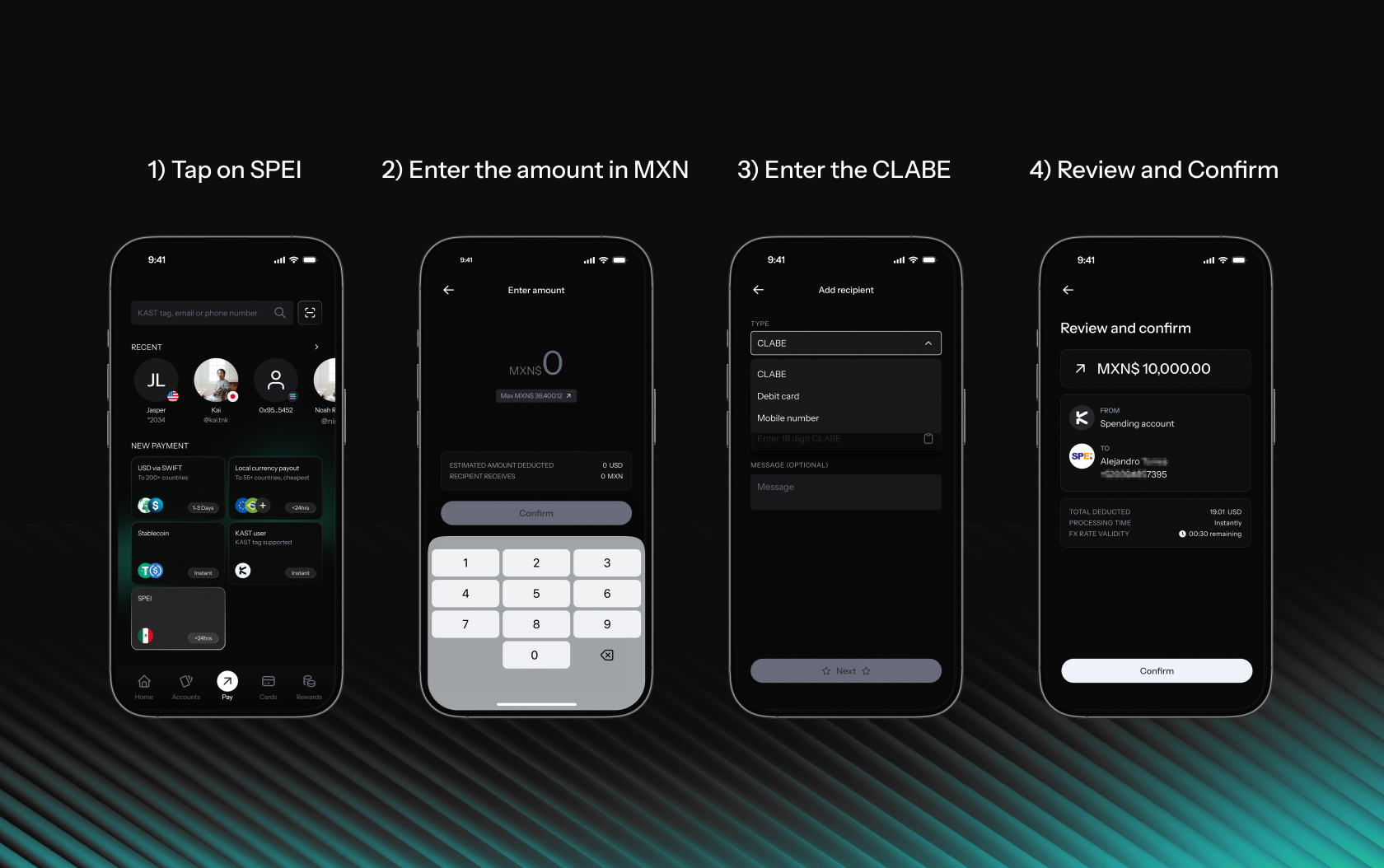
- Open the KAST app
- Tap Pay
- Select SPEI
- Enter the amount in MXN
- Enter the recipient’s CLABE
- Review and confirm
The MXN is sent through SPEI directly to the recipient’s bank account. No extra routing. No transfer fee on the rail.
Fees And Limits
Here’s exactly what applies:
SPEI Deposits (MXN)
- Transfer Fee: 0%
- Limit: No set limit
SPEI Payouts (MXN)
- Transfer Fee: 0%
- Limit: No set limit
.png)
Learn how to send and receive SPEI transfers on KAST — step-by-step:
Quick Checklist Before You Start
Before using SPEI inside KAST:
- Update your KAST app when the new version goes live
- Find and save your CLABE
- Double-check recipient CLABE before sending
- Review FX rates before converting currencies
If you regularly move pesos, this update removes one more recurring cost from your setup. Update the KAST app and start sending and receiving MXN through SPEI without paying transfer fees.